ESP32 & ESP8266 Connectivity · Intermediate · MQTT
ESP32 MQTT Room Bridge
Several ESP32s feeding one broker, with the bridge reporting the room's state as a single topic.
Firmware status: Generated from this project's own pin map and compiled with arduino-cli for esp32:esp32:esp32 before publication; bench validation on your hardware is still required.
Board: ESP32 DevKit (ESP32-WROOM-32, 30 or 38 pin) · ESP32 dual core @ 240 MHz · 3.3 V logic · build for esp32:esp32:esp32.
What you will build
An ESP32 that publishes its own sensors and combines them into one room topic, so a dashboard subscribes once.
Components
- ESP32 board
- Two analog sensors
- Relay or MOSFET output
- Local MQTT broker
Pin map for this build
| Sketch constant | Pin | What it is |
|---|---|---|
PIN_OUT_1 | 4 | Switched output — relay / MOSFET channel, 5 V coil |
PIN_SENSE | 34 | Sensor — analog output, 3.3 V maximum |
Tools
- USB programming cable
- Multimeter
- Current-limited bench supply (for anything that switches a load)
- Small screwdriver and wire cutters
Build sequence
- Confirm the broker works with a desktop client.
- Flash and watch two topics appear: the raw reading and the combined room state.
- Subscribe to the room topic from a dashboard and confirm a single message describes the whole room.
- Switch the output from the command topic and confirm the state topic reflects it immediately, not on the next cycle.
Test and expected result
Both topics publish, the room topic carries all values, and a command updates the state topic within a second.
Acceptance checks
two topics, combined payload, state published on command
Safety and limits
As with any local broker, no transport security and no authentication. Keep it inside your own network.
Hardware scope
Two sensor channels, one output, MQTT publish plus command subscription.
Connection diagram
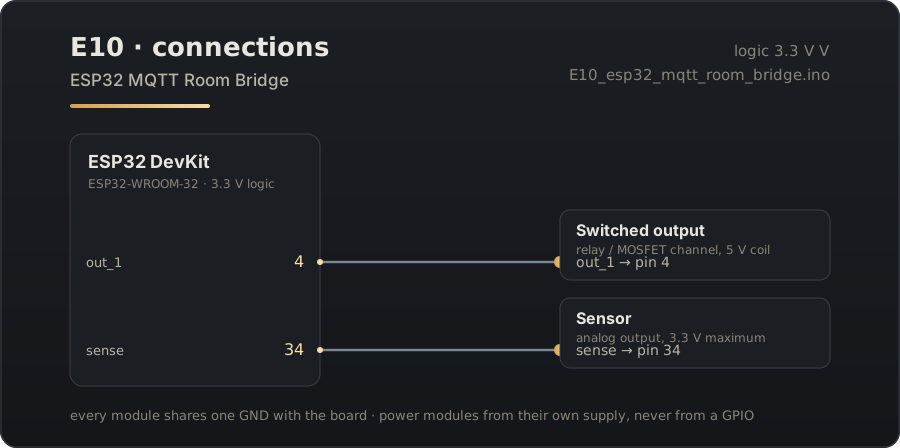
Download the connection diagram (SVG)
Download the Arduino sketch (E10_esp32_mqtt_room_bridge.ino)
Guide source: the sketch on this page was generated from the pin map above and compiled for esp32:esp32:esp32 before publication.
Related projects
- ESP32 Captive Portal Wi-Fi Manager — Boot the ESP32 with no credentials and configure its network from a phone, with the portal saved to flash.
- ESP8266 Config Portal — The same idea on the cheapest board that can do it: an ESP8266 that configures itself from a browser.
- ESP8266 Sensor Portal Logger — A battery-minded sensor node you configure in the field, with the reading shown on its own setup page.