ESP32 & ESP8266 Connectivity · Beginner · Diagnostics
ESP8266 Bench Status Page
One page that answers the first three questions about any build on the bench.
Firmware status: Generated from this project's own pin map and compiled with arduino-cli for esp8266:esp8266:nodemcuv2 before publication; bench validation on your hardware is still required.
Board: ESP8266 (NodeMCU v3 / Wemos D1 mini) · ESP8266EX @ 80 MHz · 3.3 V logic · build for esp8266:esp8266:nodemcuv2.
What you will build
An ESP8266 serving uptime, signal strength and one sensor reading, as the smallest thing worth putting on your network.
Components
- ESP8266 board
- Analog sensor or a potentiometer
- USB cable
Pin map for this build
| Sketch constant | Pin | What it is |
|---|---|---|
PIN_OUT_1 | 5 | Switched output — relay / MOSFET channel, 5 V coil |
PIN_IN_1 | A0 | Analog input — 3.3 V maximum at the pin |
Tools
- USB programming cable
- Multimeter
- Current-limited bench supply (for anything that switches a load)
- Small screwdriver and wire cutters
Build sequence
- Flash and open the printed address.
- Reboot the board and watch the uptime column reset, which proves you are looking at the live board.
- Walk away from the access point and watch the signal figure fall.
- Wire the sensor and confirm the third value moves.
Test and expected result
The three values are live: uptime resets on reboot, signal changes with distance, the sensor tracks its input.
Acceptance checks
live values, resets on reboot, sensor tracks
Safety and limits
This is an unauthenticated page on your network. It is for a bench, not for a build you leave in a public space.
Hardware scope
Uptime, signal, one analog channel, single HTTP endpoint.
Connection diagram
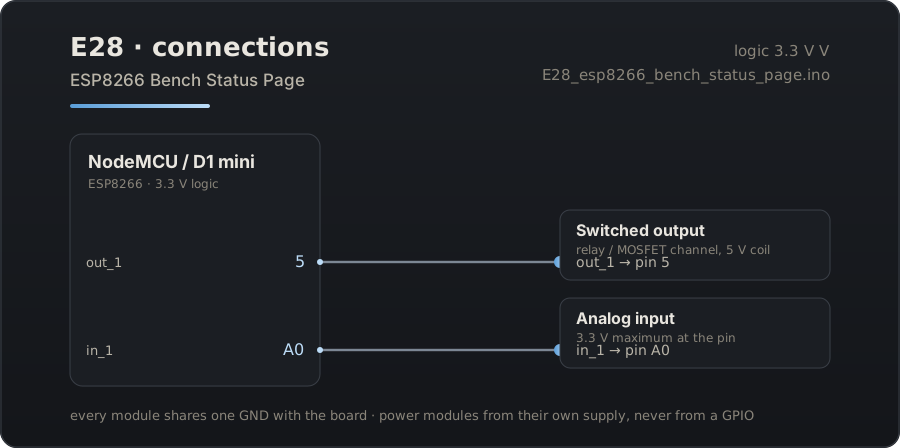
Download the connection diagram (SVG)
Download the Arduino sketch (E28_esp8266_bench_status_page.ino)
Guide source: the sketch on this page was generated from the pin map above and compiled for esp8266:esp8266:nodemcuv2 before publication.
Related projects
- ESP32 Captive Portal Wi-Fi Manager — Boot the ESP32 with no credentials and configure its network from a phone, with the portal saved to flash.
- ESP8266 Config Portal — The same idea on the cheapest board that can do it: an ESP8266 that configures itself from a browser.
- ESP8266 Sensor Portal Logger — A battery-minded sensor node you configure in the field, with the reading shown on its own setup page.